
What I find interesting about this Rolodex laptop stand is its modularity. A few years or so after it launched, it’s still on the market. I’ve been using it for two of those years with my Windows laptop, and while it doesn’t look cool or feel cool, it’s sturdy, and it works just fine.
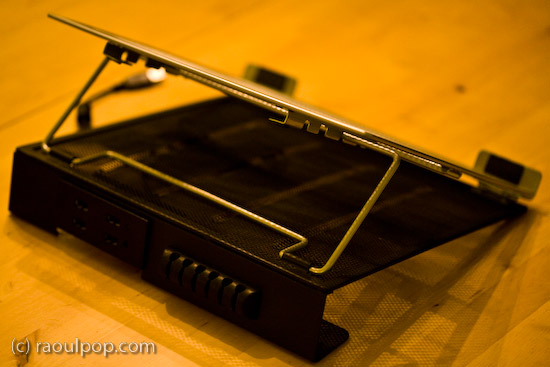
The stand is made of metal mesh and reinforced with rounded steel frames at the edges. Its tilt level can be adjusted as needed, and — here’s where the modular part comes in — it can be fitted with a wire organizer and a USB hub. The wire organizer comes with the stand and attaches as seen above, and the 4-port USB hub is sold separately. Once purchased, the hub slides into a slot on the back of the stand and is secured there by two metal arms on each side.
It’s best suited for 15-inch laptops like the one you see in my photos. Its design would make a 17-inch laptop feel oversized, and I’m not sure that it could support the weight of some of the heavier 17-inch laptops I see on the market nowadays.
The stand works best with an external keyboard and mouse. Although you can type comfortably on the laptop while it’s positioned on the stand, you’ll get tired pretty soon of the sound that the stand makes as you type on the laptop’s keyboard. Remember, it’s made of metal mesh, and it will resonate with each key click.

Once you position it at your eye level and plug in an external keyboard and mouse set, this stand will perform just fine for your needs, and at an affordable price, too.
Because it holds the laptop in place with the aid of two raised metal lips on each side, you need to make sure it doesn’t block any ports on your laptop. For example, it would definitely not work with any MacBook Pro laptops, which have the CD/DVD slot in the front. The placement of my audio line out/line in ports on my Averatec Windows laptop meant that it blocked those ports with the right support lip, as you can see below.

The USB hub that can be bought along with the stand is not self-powered (it does not have its own power supply cable), and that means it’ll draw power from the laptop’s USB port. This means you’ll likely experience power surges if you should plug in a USB drive that also does not have its own power supply. See my Logitech Alto Connect review for more details on this particular issue.


If interested, you can buy the stand and the USB hub to go along with it from Amazon. There’s even a variation on the hub which has only 2 USB ports but features a grounded, three-prong plug.
Discover more from Raoul Pop
Subscribe to get the latest posts sent to your email.
 Raoul Pop
Yup, same company. I think they still make the good old Rolodexes as well.
LikeLike
is this the same company that made the business-card-sized “contact management systems” of old? if so, bravo for them for finding a new way to come back and not just become the next ‘fuller brush’ or ‘buggy whip’ company.
LikeLike