
➡ Updated 1/14/19: I have revised my opinion of Drobo devices. After experiencing multiple, serious data loss events on multiple Drobo models, even recent ones, I no longer consider them safe for my data.
➡ Updated 3/18/09: My review of the new Firewire Drobo is now published. You may want to have a look at that as well.
The Drobo is a new way to store your data. It works like RAID, only better. Made by Data Robotics, the Drobo is an enclosure that can use anywhere from 2 to 4 SATA hard drives of any size and brand to keep multiple copies of your files and ensure against hard drive failures.

It’s all about the data
The main advantage is that consumers are freed from the problem of having to use identical hard drives (which is how things work in RAID) and can rely on the largest and cheapest drives they can find on the market for their data storage. In a word, the Drobo turns hard drives into a commodity, a building block of your data storage that can be replaced at any time with any SATA hard drive without negatively affecting your data.
Depending on the amount of total space available on the Drobo, it can withstand the failure of one or even two of its hard drives without losing any data. (Naturally, you’ll need to have more than two hard drives in there in order for it to protect against a double hard drive failure…)
It is its capacity to withstand drive failures and use any SATA hard drives that makes it both remarkable and unique for a consumer product.
I bought a Drobo a few weeks ago, and have been using it since to store my photo library. You may recall I first tried a WD My Book World Edition II, then a WD My Book Pro Edition II to store my photos, and both failed me. The My Book Pro failed me miserably, but that’s another story. (Incidentally, I’m working with WD’s advanced tech support to see if my issues can be resolved, so I may have an update on that in the near future.)
I believe I’ve finally found my storage solution with the Drobo. It offers the data redundancy I need to keep my over 36,000 photos alive and well, and it works on both my Mac and my PC. Not only that, but I know it will grow with me as my data storage needs expand.
➡ Updated 1/6/08: Since writing this article, I purchased two more Drobos. An additional one to store my videos and other files, and one more for my parents.
How it works
I bought two 500 GB SATA hard drives with 32 MB buffers and installed them in my Drobo. Installation is a snap, you just need to slide them in and a locking lever snaps into place, securing them in their slots. (If you think a 32 MB buffer is overkill for a hard drive, you might want to have a look at my review of the Dell OptiPlex 745.)
The two drives give me about 464 GB of total storage. There’s a wonderful tool called the Drobolator that lets you see exactly how much storage you’ll get with your Drobo when you stick in drives of various sizes.

There is one detail I want to point out here that you may or may not be aware of, depending on how well you read through the Drobo literature. Because there’s an upper limit of 2 TB on a single USB volume, if your Drobo’s storage capacity exceeds that limit, your computer will then see two Drobo volumes.
Let me put it another way. If you use the Drobolator and you stick 4 (four) 1 TB hard drives into the Drobo, your total available storage will be 2.7 TB. This means, according to Drobo’s literature, that you will see two volumes on your computer. (This is because of that pesky 2 TB limit on USB devices.) Given that USB 3.0 specs are in the works now, and that Data Robotics has acknowledged they’re looking at the possibility of Firewire connectivity in the future, that may be a non-issue at some point, but it is something to know about now.
➡ Updated 1/17/08: Data Robotics will soon release a firmware update that will bump the upper limit up to 16 TB for a single USB volume. Those who already own the DroboShare accessory will already be able to format the Drobo volume at 16 TB. To get the details on how this works, read my comment below.
The perceived vs. actual size of the volumes can be confusing, so let me explain it a bit further. Even now, my computer sees my Drobo as having a size of 2 TB. The Drobo only has 2×500 GB drives in there, and the total size of my available storage is 464 GB. But since the Drobo’s storage can expand or decrease, and it needs to be a platform-independent device — one that does not depend on the computer for sizing information or partition tables — it has to declare its maximum size (2TB) from the start. That’s the perceived size. The actual size is indicated by the capacity meter, and if you’ve installed it on your machine, the Drobo software, which communicates with the device and displays information from it locally. In our case, if we were to put in 4×1 GB hard drives in the Drobo, we would have two actual volumes: a 2 TB volume, and a 700 MB volume. Their perceived size will be 2 TB each. If this is still confusing to you, don’t worry. Just go by the Drobo’s capacity meter to monitor how much free space you have left, and don’t worry about the perceived size.
Transfer speeds
Some people are saying that it’s slower than other storage solutions. In terms of speed, I’ve found it to be equivalent to RAID 1 drives like the My Book Pro II (which can be configured in RAID 0 or 1). I haven’t done benchmark testing, and I don’t intend to — I focus on real world use in my reviews, not lab tests — but it’s not what I’d call slow, and it’s not what I’d call fast. It’s somewhere in the middle, and it’s good enough for me. I’m willing to give a little when it comes to transfer speeds in exchange for data redundancy and safety.
➡ Updated 5/1/08: When the Drobo will get up to and a little over 70% used space, and even before the orange light will turn on in a drive bay to indicate that you need to puchase additional hard drives, the transfer speeds will start slowing down. I’ve experienced significant slowdowns in transfer speeds, to the point where copying a 1 GB file onto the Drobo takes 10 minutes or more (when it usually takes 1-2 minutes) when the used space was 80% or more, and the orange light wasn’t yet turned on. You may want to keep this mind as you plan your storage needs. As soon as I put in another drive and the used space dropped back down, the transfer speeds went back to normal.
➡ Updated 7/1/08: Data Robotics has released a firmware fix for the issue pointed out above, and it doesn’t occur any longer.
➡ Updated 7/15/08: Data Robotics has recently released the Drobo 2.0, a Firewire/USB version of the Drobo, which is much faster than the original USB-only Drobo.
How it looks
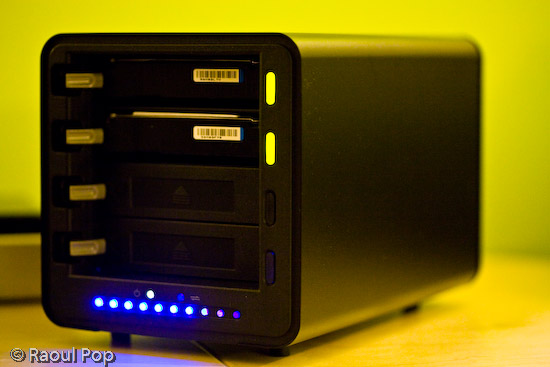
In terms of physical size, or footprint, you should know that the Drobo is significantly larger than other consumer-level storage products out there. It’s big, as you can see from both the photos and the video that accompany this review. If you’re thinking about buying it, make sure you have enough space on your desktop to accommodate it.

In the photo shown above, I’ve got a NewerTech miniStack (1st generation) sitting next to the Drobo. I’ve also got a WD Passport Drive on top of the miniStack. This is to give you an idea of how it compares to other external hard drives. The miniStack, for example, is the same size as a Mac Mini, and is actually meant to be stacked with it. I’m using it as a standalone drive, because it has both a USB and Firewire hub built in, so it’s quite versatile.
I like the design of the Drobo. I like rounded corners and glossy surfaces. Apple has spoiled me that way. The Drobo’s black, glossy ends (front and back) are really beautiful.
How it sounds
I think it’s quiet — when not accessed. Even though it has a big fan in the back, it makes barely any noise. The Drobo becomes audible when you are reading or writing to the hard drives. Because it’s a metal enclosure, the sounds generated by the seek operations are amplified slightly by it. The metal adds a melodious echo to each sound. It’s not what I would call loud, and I find it somewhat interesting. Ligia doesn’t share my opinion, but I guess you can’t please everybody. At any rate, just be aware of the fact that you will hear sounds coming from the Drobo when you’re actively using it.
➡ Updated 4/2/08: I had some noise issues with my Drobos, which were resolved nicely by Data Robotics. You can read the details at the end of my review.
➡ Updated 5/1/08: When you fill up the Drobo (all four drive bays are taken) you will notice that the fan will kick into high gear a lot more often, and even when the Drobo is barely being accessed, or not even accessed at all — only plugged into the computer’s USB port. It’s not an overheating issue, because I put my finger on all four drives, and they weren’t hot to the touch, only warm, so I think it’s a firmware issue. This has happened with two of my Drobos. It seems that if the temperature gets above 75 degrees Fahrenheit in the room, the fan will start spinning faster, and if it gets close to 80 or over it, the fan will start going nuts and will generate quite a bit of noise. For a consumer device which isn’t meant to sit in a server room (controlled temperature environment), I think this is excessive, and the fan speed needs to be adjusted in one of the next firmware releases.

Video review
I hope this video will give you a better idea of Drobo’s looks, size and functioning, as well as its sounds. I tried to make the video as useful as possible by looking at the Drobo from various angles and by comparing its size with other external drives that I own. I also pulled out one of the drives with the Drobo turned on, so you could see that that they’re hot-swappable and that it wouldn’t miss a beat. You can also watch it here, and download it as well.
If you’ve just finished watching the video, don’t worry, the hard drive status lights stopped blinking after the data check. It’s just that when you remove a drive and stick it back in, the Drobo does a thorough check to make sure all the data that should be there is there. It may even re-sync all the data across the drives. It took a few hours for that check to complete since I had over 300 GB of data. By the way, all of it (the data, that is) was accessible during the check, so yes, you can work with the Drobo immediately after you do a hard drive replacement.
A few thoughts on the design
I like the idea of the lights on the front of the drive. It’s great to have an easy-to-use capacity meter, and to indicate the health of each drive through different-colored lights next to it. What I don’t like is the blue LEDs used for the capacity meter. They’re very blue, and very strong.
Generally speaking, blue LEDs cause headaches, because the eyes can’t focus properly on them. They always seem out of focus when you look directly at them. Every time I see blue LEDs on something that’s meant for constant use I cringe. Fortunately, the Drobo isn’t meant to sit directly in front of the user, but off to the side, which is where I have it.
It would be nice if Digital Robotics would do something about the capacity meter in their next build of the Drobo. They could even leave the blue LEDs in there, but obscure the light slightly by orienting them at an angle instead of having them point straight out toward the user. I’ve found that when I look at blue LED light from an angle, it doesn’t cause the same vision problems.
I like it
Is the Drobo a keeper? I think so. I’m happy with it. Even though there are a few sticking points, it’s nothing that would have dissuaded me from buying it, even if I had known about them beforehand. As a matter of fact, I’m so satisfied with it, that I signed up for the Drobo Evangelist program. That means that between now and December 31st, if you buy a Drobo from the Digital Robotics online store and you mention my evangelist code (EVPOP), you’ll get $25 off its purchase price. In the interest of full disclosure, you’ll also help me, because I’ll get $25 for each successful sale as well. Remember, this is only until 12/31/07, unless Data Robotics extends the program — and I haven’t heard anything about that. (Updated 1/2/08). I heard from Data Robotics today: they’ve extended the evangelist program until 6/30/08. That means the discount code will work until June 30th if you decide to use it.
Let’s review
The good points:
- Data redundancy ensures availability, even if up to 2 hard drives fail
- Virtually unlimited data storage (but remember the 2 TB limit for each volume when connected through USB 2.0)
- Independence from hard drive size and manufacturer: as long as it’s SATA, it’s fine
- Size can expand as your storage needs grow
- Great design
- Ease of use
The sticking points (nothing bad, just some things you need to consider):
- Price is hefty: total cost is significant when you count in the enclosure and the individual hard drives
- You may or may not like the sounds it makes when data gets accessed on the drives: make sure you listen to my video carefully to see what I mean (if yours is making too much noise, you may need to get it replaced)
- Blue LED lights used for capacity meter are too intense and may cause headaches if you look directly at them
- Transfer speeds may not be fast enough for you
Buy a Drobo
If you’re interested in buying one, here’s where you can find one:
- Drobo Store (mention code EVPOP to get $25 off)
- Amazon
- B&H Photo
Updates
➡ Updated 1/6/08: Since I now own three Drobos, I can tell you that my first impressions about the noise were wrong. It seems my first Drobo is unusually loud. My other two Drobos are very quiet. I can barely hear them, even when writing or reading to the hard drives actively and for prolonged periods of time. I’ll need to contact Drobo Support to see if I can get my first Drobo replaced.
➡ Updated 1/7/08: I called Drobo today to ask them why one of my Drobos is making more noise than the other two. I described the situation to them, and told them I’m using the exact same drives inside each Drobo (2x500GB Seagate SATA drives with 32MB cache). Their initial response was to blame the hard drives. I doubt they’re at fault, but it’s possible, since it’s the hard drive churning noises that are louder in this particular Drobo of mine. So what I’m going to do later today, since I have the luxury of having more than one Drobo at home, is I’m going to take out the two hard drives from the louder Drobo and stick them in one of my two quiet Drobos. We’ll see what happens next. If the hard drives are at fault, then the quiet Drobo will start being loud. If not, then there’s a problem with my original Drobo. I told them all this, and asked for a case number. I indicated that I’ll be looking for a replacement if it turns out that the Drobo is at fault, not the hard drives. I’ll keep this review updated with my findings.
➡ Updated 1/7/08: Okay, spoke with Drobo again about the noise, and it turns out that the hard drives are at fault. I did just what I described above. I wouldn’t have thought it, but these two drives that I’ve got in the original Drobo are louder than the four I use in the other two Drobos, even though they’re the exact same size, brand and model. I’m going to return them and order new ones, and I believe the noise will go away. This is definitely something to keep in mind if you’re having noise issues with your Drobo. Don’t assume it’s to blame. If you can, check the hard drives first. Remember to do it properly though. You have to turn OFF the Drobo and unplug it BEFORE removing the hard drives, or you’ll lose your data. Read this clarification, and if you’re still not sure, don’t take risks, call Drobo Support and have them stay on the line with you while you swap out the hard drives.
➡ Updated 1/9/08: I still have noise issues with that original Drobo even after swapping out the hard drives. At this point, I’m not sure what to think. Could it be that Adobe Lightroom, the application I use to process my photos, places such a high I/O load on the Drobo that the hard drives will churn heavily no matter what, or could it be that this particular Drobo of mine is not phonically isolated as well as my other two? Not sure. I ordered hard drives of a different brand, to see if those will be quieter. I’m going to try those out for a day or two to see what happens. Then I’m also going to switch Drobos, and use one of my quiet Drobos for a day or two with the new hard drives and with the old hard drives, and then I’ll be able to get a better idea of what’s going on. Perhaps it’s just Lightroom causing this. Perhaps it’s the Drobo. Perhaps it’s the hard drives. But one thing’s for sure, while I was on the phone with Drobo Support, I didn’t use Lightroom heavily enough in order to compare the noise levels.
➡ Updated 2/6/08: I sent two of the original Seagate 500 GB drives back, and purchased two Western Digital 500 GB drives. The difference between them, specs-wise, is that the Seagate drives have 32 MB caches, and the WD drives have 16 MB caches. But it turns out that there’s a problem with the Seagate drives where their caches default to 8 MB if the latest firmware upgrade isn’t applied. And there is NO way to apply a firmware update to the drives while they’re in the Drobo. Doesn’t work, I tried it. At any rate, the two WD drives are quieter than the Seagate drives, although they run hotter. At least noise-wise, things are alright now, and the Drobo’s cooling system seems to handle the extra heat just fine.
➡ Updated 2/6/08: You’d think now that I’ve got the noise issues straightened out, things have quieted down, but they haven’t. I’ve got noise issues with one of my other Drobos, and this time it’s related to the fan for sure. I’ve swapped out the drives, and I’ve swapped the Drobos, and I’ve pushed on various drive bay flaps and listened carefully, and it’s the fan. Trust me, I spent about a month ferreting out this particular noise issue. I arranged for an RMA, which arrived today, only to disappoint me thoroughly.
Guess what? I received a heavily used Drobo from Data Robotics in return for my brand new Drobo (thanks for nothing!), even after I’d asked them kindly over the phone not to send me a used one or a damaged one. To make things worse, there’s serious dust in the crevices of this Drobo. The drive bays themselves are lined with dust that sticks to my finger when I touch it. One of the blue LED capacity indicators doesn’t light up (it’s broken), and as if that’s not enough, one of the ejection springs for the drive bays doesn’t work. When I wanted to take out a drive, it wouldn’t push it out. I had to point the Drobo’s mouth downward and shake it. To top it all off, it makes the same fan noise as my own Drobo.
But wait, there’s more! The firmware versions are different! While this replacement Drobo was able to read all of my data from the drives, when I turned it off (disgusted by all its problems) and removed the drives, intending to put them back in my own Drobo, I found out I couldn’t! That’s right, because the firmware versions are different, my original Drobo now can’t read any of my precious data. I’m stuck. My Mac wanted to initialize the Drobo, which would have meant erasing all of my data. I think at this point I’m stuck transferring all of my data to external USB drives and reformatting my Drobo, only to stick all of the data back onto it afterwards.
Understandably enough, I’m upset and disappointed with Data Robotics. To send me a heavily used Drobo with existing problems, and then to also put my data in danger when they’re supposed to make my data safer, is simply not acceptable. I notified them by phone and email, and will give them a chance to make things right. I’ll keep you updated of what happens.
➡ Updated 2/7/08: Drobo’s Tier-3 Support replied to my emails. They were courteous, apologized for the experience, and promised to make it right. I believe they’ll try to ship out a new drive to me in replacement in a few days. Until then, they emailed me the latest version of the firmware (which is not yet available to the public) and showed me how to upgrade my Drobos manually. I upgraded the firmware on all of my Drobos, successfully, and now my original Drobo can read my drives without any problems. I didn’t lose any data after all. I’m very glad things have worked out!
Discover more from Raoul Pop
Subscribe to get the latest posts sent to your email.
 Raoul Pop
I don’t understand how a company selling such a rubbish product and having the worst technical support in the industry can be still operational… And they keep on sending me their promotional information letters about new products!
As I bought my Drobo two years ago I thought I found the ultimate solution for storage and backups. Unfortunately all the time I had nothing but problems with it. And DataRobotics offers the worst service in the industry at least to my knowledge. I lost some data on it, managed to recover it with some third party applications but then two discs out of four stopped working within two months and were not repairable, I change them and the data was restored. And two month later it stopped working at all saying that there are no discs in the drobo… It appeared that all the 4 discs were gone and there is no way to recover any data from any of them! Now I tried to log in into my account at the Drobo site, but it didn’t recognize my login information. When I tried to get my login information sent to me by e-mail it appeared that my registration information is non-existant and my account is deleted. There is no way for me to contact their support. I found the local Asian office e-mail address but haven’t get any replies to any of my 3 e-mails. Such a good idea but what a scam!
LikeLike
Hi Raoul
In fairness to Drobo this is the first contact I have had with Drobo. The reason for this is because initially I could not get through to them on the Tech Support web interface and I never got replies to email. This might be because you have to have a case reference in the email subject line.
As my local chap always managed to fix it, but often was forced to reformat the drives to do so. It became an easier option. But now he is not there anymore and the issues have continued I have been force to persist in trying to get through to Drobo Tech Support. Contact was made with data robotics Press and Sales departments on 15th July because that was the only people I can find email for. We are now on 8th August and no further forward.
Thanks for the feedback on how my case review sounds and I will put the info in as you suggest so that people get a fuller picture.
Best of luck with your Drobos
Jamie
LikeLike
Hi Raoul
I tend to try and not mess with the Drobo and just add a batch of information in blocks when I have an amount of pictures to store away. So there is no complicated software doing backups or over writes of previous backups. I simply drag and drop files into folders with the year in the title. You can’t get more simple than that. The Drobo lost all the drive data and formating on more than one occasion and the and regardless of what the tech chap at the dealers could do nothing would work other than re-formating the drive setup.
On some occasions the Drobo would show up on the desktop and you cannot access it and Drobo dash states it is not there. On other occasions the Drobo will not mount on the desk top at all.
There is nothing tha you can really do to affect the Drobos performance when all you do is drag and drop data into folders. I have always started the Drobo up first and let it settle down before starting the computer. It really does not get simpler than that. The Drobo has 4x 1TD drives installed and they are set up as one device as recommended and set up by the dealer.
Sadly the Tech Chap is no longer there and he has never gotten to the bottom of why it crashs, fails to mount, or has lost its format. I have never had issues with the Lacie drives in 15x years other than the odd powercable.
The Drobo tech support has been the best part of useless and it has gotten to the point where I have lost all confidence in the product and the company.
For a device that is sold as safe storage and self managing, It has not lived up to any of the claims in the last ten months. It has skidded of the rails in some way every couple of months. The last time the 4x 1tb drive were wiped they were tested in another machine and when they had some software ran over them it came back is they were working in perfect condition. They were then reset up in the drobo to be a single unit again. But I still get issues. Drobo says that it is the firewire ports that are corrupting the device.
So it looks like it will sit in the corner until a purchase another multidrive device from another company.
This time I will be talking to these people: http://www.ultimatestorage.com/ They were very helpful when I originally looked around before opting for the Drobo. They are also UK based and able to deal with issues should they ever arise. I would be able to drive a device down to them and get it sorted out one way or another.
This is not something I can do with the Drobo in the UK. Drobo only have a sales unit and don’t touch any warranty repairs. You have to send your device off across Europe to be looked at by someone you can’t even talk to. Any you pay for the shipping costs because they can be bothered to have an agent in the UK. Thay is very poor customer service.
I am sure that if you get a good Drobo it is great. But if you don’t, I have not found the company to be very helpful and difficult to deal with. I think that this is because they are at a stage where ther are a small business that is exporting from the otherside of the world and have not developed enough to have the infrastructure to fully deal with their target market place yet.
I am almost a month in to having initially contacting them and am really no further forward. All they seem to want to do is close the support case when they admit I have a faulty device.
I can only call it as it is. Sadly my experience is not a good one. From some of the comment above others have similar issues to what I have experienced, so I can only take it I am not alone. But as all my drive are set up to be a single device, I can not individually input them into my Mac to get data off a single drive and as suggested above. I would guess that I would have to stack them in another device or format them singularly to reuse.
regards
Jamie
LikeLike
Now that’s much better, Jamie. This is helpful information for everyone who reads your initial comment and wonders what really happened. You should also add this to your own site, because it’s a clear explanation of what went on, and it doesn’t sound like you’re just a bitter complainer.
What else can I tell you… I have four Drobos, three USB 2.0 and one FW800. I’ve never had your problems, thank God for that! My problems, when I had them at the outset, had to do with excessive fan noise, some overheating, some dinging sounds inside the cases, all of which were resolved by Drobo Support through replacement units. All of the problems that I had are clearly stated in my review.
It sounds like your own Drobo needed to be replaced a long time ago, and I wonder why Drobo Support never took that course of action with you. It’s a shame they let things slide till they got this bad.
LikeLike
I have to say that I have been very disappointed by Drobo and the level of tech support from data robotics.
I have done a full review of the product here http://web.me.com/jamie_jones/Drobo-Review/index.html and I would not recommend a Drobo to anyone.
Product: Had a number of issues
Reliability: Poor and lost data when it had to have all the drives reformatted
Hardware: Firewire and reliability issues
Safe Storage: If you believe that you will believe anything
Tech Support: Poor at best and that is being nice
Warranty; Forget it
Customer Care: Poor at best
If you have had issues with your drobo you might be interested in the Gallery page and submitting a picture of your drobo in the bin.
Best of luck if you have a Drobo, because if it goes wrong you will need it.
Jamie
LikeLike
Jamie, while you’re certainly generous in your criticism of the Drobo, I read through your site and I couldn’t find out any specifics (how your Drobo crashed, what you did to try and recover the data, details of your experience with Drobo Support, final verdict on why it crashed, what went wrong, etc.) From the looks of it, it sounds like you gave up on the device after a data malfunction that could have been caused by user error (I don’t know) and have taken to blaming all Drobos altogether.
LikeLike
Thanks for the helpful information on this post. I think my Drobo has failed because it won’t mount. I ran “Repair Disk” in Disk Utility which took several hours, and then said it had repaired the volume successfully but it still won’t mount. I guess I’ll have to get a new Drobo and put my drives in it. The Drobo dashboard says the Drobo is “healthy” so I would assume the drives are OK. It was helpful to know that I can’t take these drives out and put them in my Mac to read the files. Thanks again.
LikeLike
Pingback: Hardware preview: Drobo S « Raoul Pop
Pingback: What’s on your Drobo? « Raoul Pop
This post has helped me in more ways than one. I already own a drobo, but what I couldn’t find a clear answer to on the Drobo site I found here. Thanks a ton!
LikeLike
You’re welcome!
LikeLike
Pingback: New hardware: DroboElite « Raoul Pop
Sorry, one little rant…
An issue I have with Data Robotics is that the Drobo Diagnostic file that the drobo dashboard generates for you to send to their tech support, is encrypted, and data robotics refuses to send a copy of of the decrypted file to me. Wait a minute? They won’t allow me to see how my own drobo is doing? Isn’t that a violation of the Freedom of Information Act? Lawyers? 🙂 This means no self-diagnosing when the support contract runs out after 1 year? It seems like a hospital denying a patient a copy of their medical records, after saying everything is A OK, when something is obviously wrong…
LikeLike
Hey all,
I just got a v2 firewire drobo, threw in 4 2tb hitachi deskstar drives. But the noise is ridiculous! When the drives are spinning up or just resting, they are perfectly quiet. But for the first hour, after I plugin my drobo on my 27″ iMac, it sounds like it’s writing tons of data between the drives, working them to death. And this happens every time my computer wakes up from sleeping, or if I turn on and plugin my drobo.
According to the activity monitor, the computer is not writing anything to the drives. Time Machine is not using the drobo. I thought it might be spotlight cataloging everything, but this happens EVERY TIME my machine wakes up or restarts.
According to drobo tech support everything is peachy. No problem whatsoever according to the Drobo Diagnostic log I sent them.
Anyone have any problems like this? Any suggestions/recommendations?
THANKS!
LikeLike
Pingback: A tally of my post ratings - Raoul Pop
Pingback: New hardware: Drobo S - Raoul Pop
Hi, Raoul
Have you tried using Droboshare with your Drobos ? I have not seen many positive review of Droboshare when connected to USB or FW Drobos. The Droboshare is pretty expensive too. Since my house is wired with Gigabit, I am thinking of putting my Drobo in a separate room (hidden away for physical security).
Thanks
LikeLike
William, I haven’t tried DroboShare yet, but would like to try it at some point. If I do, I’ll be sure to review it here on my site. Putting the Drobo in a separate room is a good idea. It cuts down on ambient noise, and if it’s on the network, you’ll be able to access it from anywhere in the house, which is great. Keep in mind though that going over the network adds extra overhead, and you’ll likely find throughput to be slower than USB 2.0, or so I’ve heard. But for me, the extra convenience of it being on the network trumps the inconvenience of potentially slower file transfers.
LikeLike
@john90, all of your questions have been answered (repeatedly) in the previous comments on this post, but for the sake of being helpful, yes, the Drobo will wipe any existing information on a drive you put inside it, and yes, you can start the Drobo with only one drive, although you’ll get a warning. You turn the Drobo off by putting it in standby from the Drobo Dashboard or by simply ejecting it from your computer, then unplugging it.
LikeLike
you seem to know alot about drobo so :
i think about buying a drobo in the near future and i have a couple of questions to ask
I already have converted an wd green 500gig to external and i have about 95gig free space and i plan to make him internal again and get another one if i buy the drobo and pt them in. so 2 500gig hdds
If i start the drobo and then put them in will the drobo format them in order to be ready and this will make me lose all my data?
Or can i start the drobo with only one hd??
transfer some of the data to the drobo with the one drive in and some to my pcs hdd .
then convert the external to internal again and put him in the drobo.
drobo formats him too. and then i transfer my data from my pcs hdd to drobo and everything is ok.(but now my stuff are safe)
how do you safely turn on and off the drobo? or does it bo it ny itself when you turn on or off your pc? cause i don’t se any power on/off button
thanks in advance.
LikeLike
ok thanks. great review.
LikeLike
hi, i put four 1TB hard drives into my drobo,
file system format – hfs+
storage capacity – 2.69
maximum capacity – 16TB
when i reach 2.69, does this mean i could take
out one hard drive and replace it with another
hard drive that has a larger capacity (i.e. 2TB)
to expand the storage capacity? and reapeat
the same process until i reach 16TB?
~thanks much.
LikeLike
Yes, if you set your Drobo volume’s capacity at 16 TB, then you can keep adding bigger drives to it until it reaches that capacity.
LikeLike
excellent 🙂 thanks
LikeLike
They’re already posted. 🙂
– Drobo S
– DroboPro
– DroboElite
LikeLike
ok many thanks Raoul 🙂
when are you carrying out a review on the Drobo S and Pro/Elites? 🙂 would be great to check out your thoughts on them
LikeLike
It’s up to you, Paul. You can add it now, or you can add it later. Not sure how much it’ll save in energy costs, but I don’t think there’s a speed benefit. As for a safety benefit, it’s possible, if you have a small amount of data, and it’s spread across four drives, that if two drives fail, you’ll still have most, if not all your data. Keep in mind though that your Drobo isn’t a Drobo S, or a DroboPro or DroboElite, so it doesn’t have built-in two-drive redundancy. The data safety would function by the law of averages, sort of like the old adage: “don’t put all your eggs in one basket”.
LikeLike
actually i had 2nd thoughts… its going to take me time to fill up my current 3 drive drobo – do you know if it is worth adding in the 4th now?
i mean, is there a speed / safety benefit in adding the 4th one from now too?
or would i save 5-10 in energy costs by only adding it when needed.
(i went for the good WesternDigital Grean power (eads) drives which are very low power consumption) sorry to ask you these questions but you’re much more experienced in the drobo world – like a jedi and im learning from you :o)
LikeLike
That was amanzingly painless 🙂
i put the drive in, and about 9 seconds all green and extra capacity noted 🙂
im going to pop in the 4th drive too now 🙂
LikeLike
ok many thanks will do this way and let you know.
I already took a back up of my drobo v1 contents onto the v2 (before firmwaring)
Firmware and Dashboard upgrade all successful.
Now to add 1 TB drive 🙂
(oops this is your blog review, not mine :oD
LikeLike
Paul, I believe you need to add each drive at a time. Add the 1st one, wait for the Drobo to sync the data across the new drive array, then add the 2nd one.
LikeLike
Hi Raoul, i got another 2 drives of 1tb each.
(same make and size as the other 2 already in the drobo)
I have the latest firmware of Drobo v1, and was about to put the first extra 1xtb drive inside, but do you know if i can quickly add the 2nd one as well?
eg i have 2x1tb drives inside already, and want to expand the capacity, but can i simply add drives 3 & 4 almost together, or do i need to wait for 3 drives to synchup/rebuild etc before i add the 4th?
regards,
Paul
LikeLike
Pingback: New hardware: DroboElite – Reviews - Raoul Pop
Pingback: Hardware review: ioSafe Solo, the fireproof and waterproof drive – Reviews - Raoul Pop
Thanks for the useful information. Have signed up with Contenture as a thanks.
Looking forward to reading lots more reviews on the site.
Keep up the great work!
Thanks
Mark
LikeLike
You’re welcome, Mark, and thank you for subscribing!
LikeLike
I was thinking of getting a Drobo for connection to the USB of the Apple Airport for time machine. That is not a direct connection to a Mac so I assume the USB issue doesn’t apply.
I am very sensitive about phantom power usage so my other question would be what power does a Drobo typically expend once it has “stabilized”? Obviously if one is writing to it there is necessary disk activity, but what about when there is nothing….as would be for an Airport application.
Thanks as always,
Barry
LikeLike
Barry, that question is easily answered if you look at Drobo’s tech specs. Typical idle usage is 5-12 watts.
LikeLike
Mark, I’ve updated the firmware on four or five different Drobo units, using both the USB and Firewire interfaces, over the last year and a half, and have never lost any data. I did however have to manually apply the firmware at times, because clicking on the “Check for Updates” button told me things were up to date when they weren’t. This usually happened when the firmware version on the Drobo was more than one iteration older than the current version available from Data Robotics.
If the data is valuable to you, then by all means have it in two separate geographic locations. If you can do it, have it in three locations. It never hurts. Don’t rely on a single storage device (even if it’s a Drobo) to store data that you can’t afford to lose. I mirror my photographic library on three different storage devices (two Drobos and one WD My Book Studio drive) in two different geographic locations.
On my Mac machines, I connected my Drobos using mostly Firewire. I did have them connected for a day or so over USB, in 2008, and copying large amounts of data (hundreds of gigabytes) at that time worked just fine for me. However, as Jeremy specifies in his comment above, it looks like the newer firmware versions have introduced a USB instability bug on Macs. So use Firewire until that gets worked out. As for the transfer speeds, they’re faster on FW800. USB 2.0 has latency issues that make it slower. I found that I got about 1-1.3 GB/min with FW800 and 0.7-1 GB/min with USB.
If you’d like to sign up with Contenture to support my site, that would make me very happy, but don’t let me twist your hand. That’s completely up to you. I only wish more of my readers wanted to and could do the same. 🙂
LikeLike
Mark:
I can answer one of your questions. If you are using Leopard, you should connect your Drobo ONLY using Firewire. There is a currently a bug that will result in the Drobo losing connection to the Mac and possibly losing data if you connect via Firewire. Since I started using it via Firewire, it has been rock solid.
http://friendfeed.com/jeremybrooks/259a6610/so-what-trick-to-getting-drobo-support-i-have
LikeLike
Jeremy, I got a chance to use my USB Drobo today, and copied about 250 GB from it to my Firewire Drobo via my MBP. It was slower than expected (between 3-4 hours), but there was no lost connection. Now I’m doing a data clone to the same USB Drobo from a WD My Book Studio Edition drive hooked up via eSATA (about 100 GB or so), and since I’ve done this before without any problems, I think it’s going to go through just fine this time as well. Not sure why you (and others) were getting that connection loss. Have you tried upgrading to the new firmware (1.3.3) to see if it helps?
LikeLike
Hi Raoul,
I am very impressed by your review, I especially like the fact that you’ve updated bits as changes occur.
I have purchased a drobo [however have not started using it yet] and have some questions (to which I would be grateful to get an answer from a drobo user).
If I have a drobo and I upgrade the drobo’s firmware, will I loose any data? I’ve read reviews where people have lost data and the firmware updates seem to me (without any investigation) to cause more problems than they solve, especially in terms of loosing data.
One of the reviews is at: http://reviews.cnet.com/external-hard-drives/drobo/4864-3190_7-32470303.html?messageID=2574727
Also, is it necessary to have the data in a second location (or am I being a paranoid)? I understand that the theory that the data is not really backed up unless its in two (or more) places (http://mydl.me) however, it seems kinda pointless to store 1.5TB on a drobo and then have to fork out on a 1.5TB drive to backup my drobo. (although 2 bad experiences in the form of a RAID 5 failures and a 1TB hdd failure experiences make me extremely nervous with my data).
Finally, as a mac user as well, do you connect your drobos via USB or firewire. What sort of transfer speeds/sustained transfer speeds do you get when you copy files of 500mb or larger? How many mb/sec?
I understand that I have asked a lot of questions and that this would require detailed answers. As such, I am happy to make a contribution via Contenture in exchange for useful information.
Thanks in advance for your time.
Mark
LikeLike
Pingback: WD TV is better than Apple TV – Reviews - Raoul Pop
For what it’s worth I moved the Drobo to my AEBS so I can back stuff up over the network, etc… It works great from there. I am thinking of getting the 2nd generation Drobo for my Mini. The external cases I have now feel quite cheap in comparison. I’ve also moved out the Samsung and put in a Western Digital Green (1TB) so I’ve got 3 of them and a Hitachi 1TB drive. Pretty neat the way it rearranges the data.
philip
LikeLike
Thanks Roul i posted a longer reply on the
http://www.raoulpop.com/2009/05/26/connect-two-drobo-units-to-your-computer-at-the-same-time/ page itself 🙂
LikeLike
Pingback: Connect two Drobo units to your computer at the same time? - How To - Raoul Pop
Paul, I finally got around to posting screenshots of two Drobos connected at the same time to my computer. You can see them here: http://www.raoulpop.com/2009/05/26/connect-two-drobo-units-to-your-computer-at-the-same-time/.
LikeLike
Yes. Once the data is remapped across all the drives and the green lights are on, you can shuffle the drives. But make sure to shut down the Drobo and unplug it before you do it.
LikeLike
Ahh…found one person who claimed that the Spinpoint drives should not be in the 4th slot. It apparently confuses the Drobo. So, once I have green light on all the drives, can I shut down the Drobo and switch the drives to different slots without losing anything or having to rebuild, etc…?
I’ve got to get used to this thing. I don’t quite trust it for my data yet!
philip
LikeLike
There was a post about 500 gig samsung’s and a Drobo on drobospace. The fellow had them failing, but it may have been the Drobo. Noone else seems to have had any issues. In any case, I had put the 750gig Samsung it in before I saw your reply. I am really confused with this business of replacing drives. I removed the Seagate 500 gig as it sounded like a tractor. The Drobo then went in a restoring protection mode (I still had only 1 TB of data on 3 TB drives). This process was to take 12 hours! The lights on the Drobo flashed red and green but on the Dashboard they are flashing red and orange with a message not to remove any drive (no message about putting one in). I got tired of waiting and stuck the Samsung in and it got recognized and that seemed to lower the time to rebuild the data protection. In the end though it will have taken 14 hours to get the steady green lights back (hopefully). So my question is:
What is the best way to replace a drive by a bigger one? Will I have to go though this 14 hour process each time I do that?
philip
LikeLike
hi check first about the spinpoint.. someone somewhere said there were problems with spinpointed until you firmware upgraded them or something
LikeLike
Raoul, I removed the Seagate 500gig drive and the Drobo is almost silent even though it is in the process of reallocating data to the remaining 3 drives. Kind of neat. I’m going to try adding a Samsung Spinpoint as they are quite silent (not as nice as the WD Green or Hitachi from that perspective) and see what happens.
Something was causing the Drobo to be accessed all the time even though nothing was happening on the computer. I even turned off Spotlight on it.
Maybe 3 drives is the optimal in terms of silence….will see.
philip
LikeLike
Of course it depends on needs, but if the drive is using power all the time, it will be wasting power. I like a drive that understands “sleep” as a near zero power solution. Consciousness of energy efficiency will be a growing issue for so many always on devices.
I guess my question would be, does this unit power down when it hasn’t got anything better to do?
LikeLike
Well I got a USB Drobo. I have 2 WD 1TB Green drives, 1 Hitachi TB drive and a Seagate 500gig drive in it. It’s certainly fast enough for what I need and I really like it but there is the noise factor. At first it was quite silent but as I filled up the unit it got quite noisy. It seems to always be accessing the drives even if nothing is going to them. I have it attached to a Mini (09) via USB. Not sure whether to move it to my AEBS as the noise is almost ok. It certainly seems louder than your video (well when it’s resting it’s like your video).
Still, I’m glad I got it. It’s a really neat device.
philip
LikeLike
Philip, remember the extra hard drives add the extra noise. With four HDs in it, you’re hearing the combined noise of all four hard drives.
Barry, my Drobos go to sleep when they aren’t used.
LikeLike
Could one connect a Drobo to a new Mac Mini (FW800) and boot the Mini from another FW800 drive which is connected to the 2nd FW800 port on the 2ndG Drobo?Would the Drobo slow down the FW800 drive? That drive is roughly 50% faster than the internal Mini drive now.
I would love a Drobo but I am concerned about noise. Would it make sense putting it on a Mini which is in the family room hooked to an HDTV? Noise is a real issue and the FW800 drive is an external fanless model.
Would getting the USB only model be better? Sounds noisy from the video. I could attach it to an Airport Extreme Base (new one) but then would that be ok for streaming video via wifi n or wired ethernet (realistically only 100Mbs since the cable is older and doesn’t get gigabit speeds).
Thank’s…philip
LikeLike
pmcd, I’ve daisy-chained another Firewire drive to the Drobo in the past, and it worked, but I’ve had problems when I put the Drobo to sleep or ejected it. You need to remember to always eject the other drive first. So for stability’s sake, I would advise you against it. What I did to improve stability was to daisy-chain the Drobo to a primary Firewire device, like the WD Studio Edition II, and that seemed to work a little better.
As for the noise isues, I connected a Drobo to a WD TV for my parents, to share their entire media library (movies, documentaries, music, photos) and make it playable on their HDTV. That has worked out great, and the noise is minimal.
The USB-only model is okay. I have two of those and the speed is sufficient for movie playback. I haven’t experimented with attaching mine to an Airport Extreme Base, so I’m not sure how that would work out. I assume it will, but you’re on your own there, unless you can find someone else who’s already done it.
LikeLike
Anyone know something about DroboPro?
LikeLike
Corel, see my review of the DroboPro.
LikeLike
Pingback: Hardware review: Second-Generation Drobo - Reviews - Raoul Pop
Raoul,
Thanks for the follow-up!
Barry
LikeLike
Barry, I got official word for you on your comment (#120 above). Sorry it took so long. The DR guys got back to me right away, but I only got around to replying to you today. Here’s what they said (quoting their email):
They also suggested you use a UPS. I got one for my Drobo because I’m in a similar situation to yours. I’m staying in Romania, where power failures and voltage variations are to be expected, and I don’t want to burn the circuits in my electronics. The UPS has worked fine for me so far, and it’s not a fancy one, just one that will power my stuff for about 10 minutes. All I really needed was protection from short surges and power cutouts.
LikeLike
I’ll see if I can get to it. Ping me if I don’t do it within the next week or so. Kind of busy at the moment with taxes and other things.
LikeLike
and is it possible for you to take a screenshot of what the dashboard / mycomputer screens look like with 2 drobos? that would be cool :o)
LikeLike
ahh that’s great news indeed :o)
thanks Raoul.
Can i ask how you first used the 2nd drobo?
eg, should I completely disconnect the 1st one, and plug the 2nd one in (and name it first), and then reconnect the 1st?
LikeLike
Barry, I’m going to try and find out what (if anything) happens in the situation you described.
Paul, the answer is yes. I’ve done it to transfer data between two Drobos, using both USB and Firewire ports (Firewire and USB; USB and USB). In both situations, I had no issues, the Drobo Dashboard software recognized both Drobos just fine, and was able to display the proper details for each. I would name each Drobo differently though — it’s not necessary, but it’ll make you less confused if you try to put one on standby from the dashboard.
LikeLike
btw Raoul, do you know if 2 drobos can be connected to the same PC?
(without droboshare)?
i have a GEN1 USB2 drobo, and if i get a 2nd one (most probably gen2) can i connect it via usb as well?
(im thinking in terms of backup up all existing data directly from 1 drobo to the other, as an of-location backup.)
LikeLike
hi i had a power cut while using it but just normal read/write not rebuilding with new drives etc. it was ok.
i dont know for sure, but i’d imagine it’s like a defrag… eg read, write, verify (or verify twice) THEN delete if you need to.
if it follows those lines, then the data must be safe.
LikeLike
I read somewhere…and it may have been covered here in the voluminous blog…..that if you add a drive and there is a power failure while it is being integrated, you lose all your data. The integration time cited was on the order of 2 days. Where I live,power failures are not uncommon and having a UPS good for 2 days is not practical….any comments on this?
Thanks
LikeLike
Pingback: The fastest way to back up with Time Machine | Raoul Pop
Raoul –
I’m getting ready to purchase a 2nd Gen drobo to house my iTunes library. I’ve recently gone to an all-iTunes media system and am adding about 20GB/monthly so the expandibility is a big plus. I’m going to start with a 2TB total capacity – approx 1 for storage and 1 for backup. I’ve run the drobolator to check out the storage totals.
My question is this: Is it better to run 2x1TB drives or 4x500GB drives? I’m weighing cost and safety as factors and am not sure what’s best.
LikeLike
Jim, I’d go with 2 x 1TB drives, because there are less platters to spin as the Drobo looks for the data for read/write operations. Plus, you can readily expand by inserting a new drive without needing to remove an existing one.
LikeLike
Pingback: blog of kaiyen » Drobo: my next step up in storage?
Can you daisy chain 2 drobos together and have them show up as one drive
in effect creating a 8 drive drobo
LikeLike
Adam, that’s doable by employing a software RAID solution on the OS side which ties the two Drobo volumes together, but I wouldn’t advise it. You’d have too many layers of management around the data. You normally have your data sitting on your HFS+ or NTFS or FAT32 volume, which itself sits on the Drobo’s data management array, which sits on the Drobo’s own file system. You’d be adding yet another layer, this time managed by software, which imo would make things too complicated and likely lead to data loss.
LikeLike
Pingback: Storage drops below 9 cents per terabyte by Raoul Pop
The question of “what if the company Data Robotics dies” is still a good one. While the Drobo provides some recovery from disk drive malfunction, there’s a single point of failure in the Drobo itself, if there’s no other way to get your data off the drives. There are a few responses:
1) Keep checking on the company – if Data Robotics ever goes belly up, buy a new system from somebody else at the time and transfer all your data to it.
2) Buy two. If one fails and the company isn’t around to replace it, you can recover all your data through the other one (not likely both will fail at the same time, while all the disks are still good and potentially recoverable).
3) Plan to borrow a compatible Drobo from a friend or otherwise find a loaner, if yours goes out and no replacement is available from the manufacturere.
4) It would be great if Data Robotics would release a program for Windows which could extract the data from Drobo formatted drives attached directly to a PC via SATA. It could be read only. It should deal with extracting data in the face of a failed drive but need not rebuild. So even if you could not get a replacement Drobo, you could recover your data. Of course, a program for the Mac would be good too, but virtually every Mac user can either run Windows or easily find a Windows machine to use (heck, you can buy a low end windows machine cheaper than a Drobo, and much cheaper than losing your data). This would be the ideal solution, and would make a Data Robotics device more comfortable for many people, including me.
LikeLike
Pingback: Is it easier to design for the enterprise or for the consumer? by Raoul Pop
Hi Raoul,
This is an excellent review! I’ve found it very useful for making storage decisions. I started with a Sony tape drive and Retrospect 6 for my iMac. Retrospect 6 did not back up some files which I can now never replace. I next tried a WD MyBook Mirror Edition. The WD manager software caused kernel panics, and on Windows…well, it just sucks. That’s going back.
Now the plan is to use a Drobo with Time Machine to back up my documents, music, video and graphics files (after I upgrade from 10.4.11 to 10.5). Then a shell script to back up my VMWare Fusion 2 virtual machines (I’ve got about a terabyte’s worth of data there).
All of this will protect against hardware failures, but because the Drobo shows up as a regular disk, what’s to protect the backed up data from software that runs amok on the computer? (Yes, I’ve seen this happen, and on a server no less!) Because Time Machine backs up in real time, it’s not like I can run a backup and then disconnect the Drobo until the next backup window. Having said that, is there a way to encrypt the data on the Drobo? Sometimes I take work home, and by law it has to stay encrypted.
LikeLike
ChrisK, you can’t do that. The drives are part of a single volume.
Also, be careful: if you pull a drive out of the Drobo while the system is on, it will assume it’s a new drive when you put it back in, and it will wipe it clean. Always have it off when you remove drives.
LikeLike
Corel, the Drobo uses its own file system, and any files on the drives are unreadable when you pull it out. Besides, I think it stores fragments of files on each drive, for data redundancy. Not sure exactly, but no, I don’t know of a way to get at the files outside the Drobo.
LikeLike
Raoul:
I’m considering a Drobo with Firewire 800 to backup a couple iMacs in my office. Is it possible to configure it such that slots 1 & 2 are TB drives and slots 3 & 4 are an archive of 1 & 2. My goal it to be able to take drives 3 & 4 off-site each night in order to prevent data loss in the case of theft.
Thanks!
LikeLike
Raoul what happend if you pull out 1 hdd drive? The hdd have any data?
LikeLike
Hi Raoul! You know a palce where i can read a Drobo VS WD ShareSpace? 😛
LikeLike
Phil, have a look at how to transfer photos between LR catalogs, and in particular at this comment on that article.
LikeLike
Hi, I have many images processed through Lightroom on my desktop at this point and I was planning on a new laptop for teaching, I would be using lightroom and accessing my drobo by both. How does one go about centralizing the LR database I have amassed on the desktop? I welcome any input.
LikeLike
Pingback: links for 2008-12-10 | About My Days
Raoul – One thing you haven’t mentioned is how well LR works with the Drobo. I’m considering the purchase of one after I return the 5 drive eSATA I’ve gotten but it’s horribly unreliable and keeps rebuilding.
I wouldn’t be using the files on the drobo daily – but when I wanted to use them – I wouldn’t want to have to move them. The catalog will not be on the Drobo – only the actual photo files.
Thanks for the great resource.
LikeLike
Wayne, I think your confusion lies in thinking that to your computer, the Drobo would seem like some different sort of drive. No, your computer would see a Drobo volume as any other external drive, and would back up to it as you would normally back up to any other drive. Restoring from the Drobo then becomes a matter of being familiar with your backup software and knowing how to perform a restore operation. Check the user manual for the software you’re using and go from there. Hope this helps.
LikeLike
I have a computer with a “C” drive (sata), only sata drive in the computer, has all my data on it. Say I have a Drobo with two (2) 500gb sata drives, connected to my computer up and running, all is well in Drobo land (backing up my “C” drive). My “C” crashes,I have to install a new drive, how will Drobo restore my data?? One more, my motherboard goes south (fries), I get a new system (new HDD and all)how will Drobo help me get my data back??? Have I missed the post where someone used Drobo to restore all of the backed up data to a new “C” drive?? If I did am sorry for taking up your time. Great review though, thanks, Wayne
LikeLike
jmb, I believe only Seagate makes 1.5TB drives (currently), and there are some issues with the firmware of those drives. Data Robotics actually published a warning about those drives’ incompatibility with the Drobo. So, for the time being, 1TB drives are the largest drives you can put in a Drobo.
LikeLike
I like Drobo idea- you can use different manufacturer hard drives together or mix and mach models as long as they are all SATA drives. Also there are tools provided to see how your hard drives are doing. Of course there are some minuses too- proprietary file system and slow speed. I think FW 800 hard drives are faster than Drobo. I also wonder does Drobo support 1.5TB hard drives? they list only 1TB hard drives on their drobulator
LikeLike
Raoul, thanks for the in-depth and continuing discussion on drobo. It was very helpful for me to make the decision to buy one (in the near future) since you work through the real world issues.
Of course, there is no silver bullet that solves every conceivable problem. But, drobo solves the problem of duplicating data and being able to easily recover it in the likely event of a spindle failure. It solves the problems of managing large amounts of data in disparate locations and RAID volumes that inhibit data safety because of the management overhead.
Those cover 80% of the threat with just 20% of the effort.
If you are worried about your space burning down, get two and send one away every day.
If you are worried about having to buy a new BetaMax, buy two now and save one for the rainy day. (or bank on being able to get one on ebay)
If you are worried about someone stealing it, use the kensington lock port.
If you are worried about someone reading your secret data, encrypt it before you store it.
If you are worried about a power failure corrupting drobo, get a UPS.
But, if you are worried about what would happen if one of your several spindles did not spin up one day, get a drobo. This is especially true if you have a number of different drives today and some are SATA. You can scavenge some or all of your existing drives to populate the drobo.
As for the expense… fine, they are not cheap. But neither is a Mac or anything from Apple or Microsoft. Neither is the time invested in creating what you want to store.
And thanks to Rich for the $50.
LikeLike
Drobo looks like it will address the #1 threat to my data, namely failure of a drive. But what about the #2 threat, that it gets stolen along with my computer when someone burgles my office? I presume it needs to be close to my PC to support a USB/Firewire connection, so I can’t just hide it in a closet somewhere. Anyone know of a way to physically secure one of these, to deter someone from just carrying it off?
LikeLike
Hi Raoul. Thanks for the very informative review of the Drobo along with your conscientious efforts to answer every question.
One small comment about Yacko though. I think his point about the proprietary Drobo datafiles was a fair and valid one. Say you have TBs of data stored on a Drobo when after 4-5 years of faithful service, the hardware fails. If there are still Drobos available then you can (or are forced to) purchase a new one and everything is great. However, if you find that DR has EOL’d the Drobo, merged with another company or gone to the wall (which is very possible in the current economic climate) then you are in deep, deep trouble. Lets face it, all things come to an end eventually. All your efforts to back up data will be for naught. We have seen this with formats such as Betamax and will probably have the same problem with VHS in the not too distant future. The major difference with these is that you can actually get tools to convert them to DVD.
In my opinion, DR should provide some sort of recovery software to allow you to scrap data off of dead Drobo HDDs. At the end of the day its YOUR data, not Data Robotics.
I for one will be staying away. For now at least…
LikeLike
Pingback: WD TV is better than Apple TV by Raoul Pop
As long as you don’t break something when you fall there, Brian… 🙂 Hope things work out for you either way.
LikeLike
Thanks for the review. I’m on the fence, and you’re helping me fall off onto Drobo’s lawn.
LikeLike
Glad to hear you had a good answer back, Iain! I have found them to be straightforward and helpful as well in my interactions with them. You may have to wait a bit to get a response sometimes, but they do try to help.
LikeLike
Raoul,
had a reply from Tom Loverro of Data Robotics; to paraphrase:
Tom acknowledges that DR’s technical support has not always been up to the mark, agrees that this is unacceptable and says that the company is recruiting to “increase both quality and responsiveness”
DR have 40,000 systems in use, so this helps to put the number of reported problems into perspective (though they are no less serious to the individuals concerned)
Most of the problems with Firewire 800 systems have been with Windows esp Vista 64 and these are primarily due to problems with a third party Firewire driver and DR are working with the company concerned to address this (I believe this has been a fairly protracted process)
Tom acknowledged that a Drobo to Droboshare USB 2.0 connection could be a bottleneck but noted that network speeds for the type of setups usually seen where Drobo/Droboshare are implemented only rarely exceeded that of USB 2.0.
Overall I feel that Tom has answered as straightforwardly as possible. In the end I guess people have to make their own decisions. I am considerably reassured and now just have to decide whether to ‘jump’ now or wait a little while to see what DR produce next.
Cheers
Iain
LikeLike
Raoul,
Hopefully you won’t ever lose any data.
The difficulty is in knowing what fraction of Drobo users are having problems. In addition I’m always happier to deal with companies that treat their customers well when there are problems, whether they are directly attributable to the product or to user error. The trouble is that the longer you go on without problems, the worse it will be if there is a catastrophe!!
I’ve emailed Tom Loverro of Data Robotics and have had a brief “I’ve been out of the office” type of reply and am waiting to get a substantive reply to my email.
I’ll let you know what happens.
cheers
Iain
LikeLike
Iain, not sure what to tell you about those problems. All I can say is that my Drobos have stored the data I placed on them reliably. I haven’t lost any data (yet), thank goodness!
As for the Droboshare, perhaps its possible Ethernet throughput is not greater than the USB 2.0 throughput, so it made sense to use USB. It is, after all, the most common way to connect external storage devices.
LikeLike
I’m really interested in the Drobo and would plan to hang it off a MacMini on a home network for Time Machine backups etc.
I’m really concerned however about the feedback at the Skybox USA website and some other ‘horror stories’ that have surfaced
http://skybox-usa.biz/Data-Robotics-DR04DD10-Drobo-4Bays-USB/M/B001CZ9ZEE.htm?utm_campaign=froogle&utm_medium=organic&utm_source=froogle-GB&id=uk#
I understand that any technology can fail but given that the Drobo is designed to give peace of mind it is worrying a) to hear of it (allegedly) frying all its drives and b) (more worryingly) the poor technical support provided by the company and the apparent lack of interest shown by support staff.
If it were to be reliable it would seem to be the best of the bunch of similar bits of kit available for the home user but at present I’m too worried that it will destroy all my data to take the plunge and it would seem mad to have to have another backup solution to cater to the uncertainties of using the Drobo.
I hope that someone from Data Robotics will reply to this.
Cheers
Iain
PS what’s the logic of only being able to connect a Firewire 800 Drobo to a Gigabit Droboshare with a USB 2.0 connector???
LikeLike
Misha, by that I meant I’d remove the USB and power cables to make sure the Drobo is completely off. Otherwise it’s not advisable to swap the drive sets. The Drobo might think you’re adding extra storage and wipe them.
LikeLike
Ah ok, however, what do you mean by ‘remove all the wires’? Couldn’t you just take out the drives by themselves, put them into the new drobo and thats it? Or is there more hardware you have to take from the old drobo?
LikeLike
Misha, I wanted two Drobos for redundancy and for extra space. For not at least, hard drive capacities are limited to 1.5TB (2TB drives are in the works). What this means is that the maximum capacity of a Drobo is limited to 4TB, and if you need more space, you’re going to need another Drobo.
About the redundancy part — say a Drobo goes down for whatever reason (the hardware stops working). That’s okay. I can turn it off, remove all the wires, take the drives out (as a set), and plug them into my 2nd Drobo, then go right back to work. Otherwise I have to wait for a replacement to ship out from Data Robotics, and that may take some time, not to mention that if the Drobos are out of warranty, it’s also going to cost money.
LikeLike
Raoul: why do you have two drobos? Sorry you already answered this.
LikeLike
the trick is to simply not align the Drobo square on.
eg, i have the front left corner facing me. 🙂
LikeLike
finally someone to say blue LEDs are terrible to look at. and here i was thinking my eyes were fubar-d every time i look at one. i hate blue led-s. this box looks like a nice array. it got me interested.
LikeLike
Tony, you may need to re-read the section where I talk about how the Drobo calculates space and how that space appears to the computer. The Drobo de-couples the notion of available hard drive space and available volume space.
One of my Drobos is formatted as an 8TB volume, but has only about 2.4TB of hard drive capacity. But that’s okay, because as I add or replace hard drives with greater capacity ones (1.5TB, 2TB, etc.), the volume will still appear as 8TB to the computer while the combined hard drive space will increase.
When the available hard drive space will outgrow the 8TB volume capacity, the Drobo will create a second volume that will appear on my desktop. I haven’t reached that point yet, so I’m not exactly sure how that step is handled by the Drobo.
LikeLike
I’m a little confused by the capacities that I’ve read here. In one post you state that one of your Drobos is formatted as an 8TB volume. If the unit only holds 4 drives and the largest drives currently out are 1TB how do you achieve that?
Also, is it true that Drobos have built-in battery backup to protect against brownouts?
Great website! Thanx!
LikeLike
Pingback: After one week with the Drobo v2 - All Narfed Up
Drobo is indeed expensive toaster look-a-like. I plan to get one of those via ordering them.
Downloading music from the web can sure fill up one’s hard drive. which is difficult keeping track when storing media unto DVDs and CDs.
backing up documents and media stored on one’s desktop is essential. but the kicker is computers can crash unexpectedly.
Backing up Drobo can be downright expensive when using external hard drives.
Unless if one uses a hard drive dock(hard drive docking station) storing those puppies in clean dry place. but the problem remains of buying internal sata HDD.
Talk about taking extreme precaution.
LikeLike
I was a big proponent of the Drobo, until I started to have weird problems with it. My latest odyssey is documented here; http://technicalalex.com/2008/08/17/drobos-darker-side/
In short, the drobo’s work great, until they don’t, and then the support can really be hit or miss. I’m reserving judgment until they actually bother to get back to me (It’s been a couple business days now, and I haven’t heard anything).
LikeLike
Diganta, I will do another review, if and when I get a Drobo 2.0 unit from Data Robotics. I’d love to have a look at it, but I’m not sure when that will be.
LikeLike
Now that the new Drobo 2.0 is here with FW 800 will you be doing another review?
LikeLike
Hey thanks for this great review. I put off ordering a drobo for a year or more but now with the 800 firewire version I’ve ordered.
However I’m concerned about noise levels – I have a Mac Pro which is relatively quiet – I’m not so much worried abou drive noise (i’ve got WD 1TB server drives that are fairly quiet) but about power supply and fan noise.
Can anyone comment specifically about NOISE levels and even better if anyone has a new one, which they say are quieter than the old ones.
LikeLike
Phil, the Drobo is not RAID. It uses its own proprietary way of storing data redundantly. There’s more info available on it on the Data Robotics website. For now at least, the Drobo works on USB only.
LikeLike
Hi
I am very interresting in this product… It is a really great on paper…
I already have an ACCUTA with a RAID5 system.. Is it the same way ?
. 2 drives in : RAID mirroring ?
. 3 or 4 drivers : RAID5 ?
It means that in the one case you lost 1 drive capacity, and in the secund case, you lost 1/4 of free space ?
And if you put different disk capacity, do you lost more free space ?
I have very important informations to save (essentially photo) so I would like to have those precisions if possible…
If it is like this, it is very good. Because you don’t have to keep the same size from one disk to another, and there is an automatic detection of number of disk you putted in, it is very very nice..
I would prefer a Firewire 800 connection… to plug in my iMac..
Your video is very great and clean, thank you very much
Phil
PS: excuse me for my english, I am french
LikeLike
Pingback: What’s on my desk? by Raoul Pop
Hi Again, we had a power cut here, and luckily my pc and drobo all worked fine again.
(i have them behind a surge protecter anyway, but am glad i found out my power cut question, at least for normal usage, in a good way) :o)
regards,
Paul
LikeLike
Jeremy, see the How It Works section in my review. This is already explained there. The OS sees the total volume, which can be up to 16TB. It doesn’t see the free space correctly. Only the Drobo Dashboard does that.
LikeLike
I found this on Drobo’s knowledge base here:
What happens if the amounts of disk space I add exceed 2 Terabytes?
SYMPTOM:
Going beyond 2TB of disk storage in drobo
RESOLUTION:
Drobo is designed to handle this situation automatically. When the total storage offered by the inserted drives exceeds 2 TB, Drobo automatically creates a second 2TB volume which appears as another volume icon on the Mac’s Desktop or as a new Drive letter on the PC.
So it sounds like this is old information — the new firmware makes volumes >2TB possible. That is great news! Since it is impossible to currently have 16TB of available space in only 4 drives, I assume that this number is what Drobo presents to the OS, and the OS will see available space based on the installed drives? For example, 1TB free, 15TB used?
LikeLike
I was under that same impression, Jeremy, but I ended up re-formatting both my Drobos after the firmware was released. One of them is now 4TB and the other is 8TB. They show up as single volumes on my Macs.
LikeLike
No Jeremy, that is incorrect – the slider i described makes it possible to go up to 16TB. Haven’t done this myself yet, but drobo tech support told me this on the phone and i tried it, but didn’t hit final step as i havent yet backed up my stuff.
LikeLike
I was under the impression that USB can only address volumes of 2TB or less, which means when you use >2TB, your computer would mount the Drobo as multiple volumes. Is this incorrect?
LikeLike
Dudes, the current firmware 1.1.2 and maybe even the previous has the ability to format for up to 16TB for USB (no dorbo share). This is the 3rd screen in the formatting process, featuring a slider. Check it out: http://badmagicnumber.net/media/pics/drobo_partition_slider.png
Note, boot up time is supposedly increased 1 minute/1 TB, although at 2TB my boot up time seems way less, more like 25 seconds, not 2 minutes.
LikeLike
Pingback: Drobo overestimates used space by Raoul Pop
Pingback: A weekend down in Florida by Raoul Pop
Pingback: Updates to my Drobo review by Raoul Pop
Chris, just timed the startup time (from sleep), and it’s 5 seconds or so per drive. That means that it’s 10 seconds with 2 drives, 15 seconds with three drives, and 20 seconds with four drives. They’re started up in sequence.
LikeLike
thanks for your review, and some other research i did, I bought a Drobo, and 2x1TB western digital GP drives..
so far so good, and its quick silent, and cheap on power too 🙂
(btw in my own opinion, the Drobo looked much bigger in your video then i found it to be in real life. here for me, it’s like a small toaster but shorter. but it sure does look Slick in the video and real life :o)
LikeLike
Chris, to answer your first question, yes, the drives would get formatted when inserted into the Drobo. Your data would get erased. If you get a Drobo, make sure you buy enough hard drives so that you can copy the data from your My Book Pro drive onto the Drobo. Use the Drobolator tool on the Drobo website to see how many drives you’ll need and what sizes you should get. You can also read this article on hard drive prices I wrote a while back to get an idea of the best deals you can find.
As for your second question, I haven’t timed the spin-down period on a Drobo, but it’s definitely more than 5 minutes. When the Drobo wakes up and spins the drives back up, I believe (but don’t quote me on this) that it starts them up in sequence, but it still takes only 20 seconds or less from my experience.
LikeLike
One more thing. I mentioned earlier that my WD My Book Pro Edition II is working fine but I want to go with a Drobo because it will allow adding more drives and the WD goes into power save (spins down the drives) after 5 min and there is no way to change that. If it was set to 1 hour I would be much happier with it but 5 min is just way too often since it takes the drives about 20 seconds to spin back up. Does the Drobo spin down the drives or just run them all the time? And if it does spin down the drives how often does it do that and can you change the timer? I also find myself wondering how long it would take for the Drobo to spin up 4 drives if it does spin them down. The WD takes about 20 seconds because it spins them up one at a time.
Much thanks for all your work and the great review! Almost all of my questions have been answered except for these two points and I have found all of my answers from your review and/or the links that you have provided here. Great job!
LikeLike
I have been doing a lot of reading on this product and there is still one thing that I am not 100% sure about. I currently have a Western Digital My Book Pro Edition II (Just like the one you are having trouble with but I am using Windows and mine works just fine so far) that has 2x 500GB drives inside. Those drives have a lot of my data stored on them in RAID-1 so if a drive fails I will not lose my data. My specific question is that if I remove the 500GB drives from the WD enclosure and connect them direct SATA or through any other USB enclosure I can see all my data mirrored onto each drive. I would like to buy a Drobo and put those drives into the Drobo but I don’t know if I will lose my data in a mandatory initial format or not. It sounds to me from what I have read that it would require an initial format and erase my data but I would like to be 100% sure. (I would back up my data either way before attempting something like this of course but I would still like to see this type of question addressed.)
LikeLike
ahh yes, i wouldnt like you to try it out just for the sake of posting the asnwer here 😀
ok thanks very much indeed. (i just started posting and reading on drobospace as well, and am getting more inclined to buying one 🙂
here is a tip for you… you can get Black masking tape/ which is black cellotape strips, and stick it over the outer front case. then you can just make a small hole in it using a pin, wherever the blue led lights are.. that should give you a tiny hint of capacity, without all the glare, and you can still keep the drobo on yoru desk (much better than the floor).
(it might not be the “nicest” looking thing, but hey, i go for practicallity anytime – (plus anyone looking at it, will still be partially blinded by the lights and not notice the black cellotape) 🙂
regards,
paul
LikeLike
If the power gets cut, provided there isn’t an electrical surge that burns its circuitry, I assume the Drobo will pick up the data synch where it left off. I’ve never tested this though, so I can’t vouch for that capability. My data is much too precious to play with it like that, and I hope I don’t have to face that situation at some point unless I know for sure the Drobo will pull through it while keeping my data safe. I suppose it’s worth investing in a small UPS device, just in case.
LikeLike
Excellent, thanks for post 49 Raoul 🙂
LikeLike
i just saw the next paragraph 🙂
one other thing though… what happens if there is a power cut during its re-synching?
is drobo intelligent enough to read/synch/verify first in cases of power cuts etc?
regards,
paul
LikeLike
Paul, I answered your first question in commment #4. Yes, you can readily switch drive SETS between Drobos without losing data, as long as both Drobos are OFF and unplugged. Remember, it’s important to keep in mind that you need to switch the drives as SETS, not individual drives.
As for how I use my two Drobos, I store my videos on one and my photos on the other. They’re both in use. And I know that since I have two of them, that should one of them go down, I can swap my drive sets between them until I get a replacement from Data Robotics. It provides an extra layer of hardware redundancy.
LikeLike
Hello Raoul, thanks for the drobo review and information.
In your entry “Updated 1/7/08”, regarding drobo unit 1 being noisy or drives being noisy…you say this:
“since I have the luxury of having more than one Drobo at home, is I’m going to take out the two hard drives from the louder Drobo and stick them in one of my two quiet Drobos”
WAIT :o) can you actually do that? i was under the impression that as soon as you put a drive into drobo, it wipes it!?
If not, could you please help us to better understand how to use 2 drobo units? (eg, could i have 1 drobo unit plugged in with drives inside, and could i have a spare unit in my room, unplugged. And if the 1st unit has a hardware fault, could i simply take out the drives, and put it into my spare 2nd Drobo unit, and plug unit2 into my computer, “without” losing the data on the drives?
regards,
paul
LikeLike
Pingback: The packages return… again by Raoul Pop
Pingback: FedEx forgets how to deliver packages by Raoul Pop
Hi Raoul. Question about drives. I’ve got three 750GB Seagate drives in my new Drobo. You mentioned:
“But it turns out that there’s a problem with the Seagate drives where their caches default to 8 MB if the latest firmware upgrade isn’t applied. And there is NO way to apply a firmware update to the drives while they’re in the Drobo. ”
Any idea how to check the firmware on my drives? I’d obviously like to use the 32MB cache vs 8! The firmware version is printed on the drive itself (so if I turn off Drobo, I can get those numbers), but how/where can I check for an update, do you know?
Thanks. There’s also some discussion boards on Seagate’s site I’m checking through.
LikeLike
Pingback: What I did in 2007 by Raoul Pop
You can tame those LEDs by “painting” their domes with a Sharpie pen. You can attenuate them to whatever degree you’d like. Still visible, but they return to being “indicators” instead of room lighting 🙂
LikeLike
Pingback: A look at hard drives: finding the best deals by Raoul Pop
thank you so much for the info Raoul.
LikeLike
Vaynard, the hard drive buffer size doesn’t matter. Neither does the brand or model of drive. As long as it’s a SATA drive, you should be fine.
LikeLike
Pingback: The next stage for Lightroom by Raoul Pop
Raoul i need your help. If im using different brand of hdd and those hdd have different cache buffe, is that ok for Drobo ? thanks for your time Raoul
LikeLike
Wolf, that’s a yes. I’ve done it several times already in order to troubleshoot the noise issues. So yes, as long as you have different sets of drives, and you keep them separate, and you shut down the Drobo completely when you switch out the sets of drives, you should be fine.
As for FW800 question, I don’t know what you mean. Can you rephrase it? If you’re referring to the possibility of a future FW800 Drobo, and whether the drives used in a USB Drobo will be usable (as a set, maintaining the data) on a FW800 Drobo, my guess is yes. The connection (USB vs. Firewire) is just a means of communication between the Drobo and the computer. The Drobo has its own little OS and circuitry, so I assume that’ll stay the same regardless of the connectivity (USB, Firewire, Network, etc.). But then again, there isn’t even talk of a Firewire Drobo at all, so this is all hypothetical.
LikeLike
Is it possible to switch different sets of 4 drives? (After shutting down the drobo?)
If so, the Drobo would be great for using our our old (and small) drives for emergency backups.
Will a FW800 be compatible to the current USB 2.0 version?
LikeLike
16 Terabytes … just after I finally set up all my assets, and copied them over to Drobo … ugh … now to back them up … and run the firmware update … when its available 🙂
LikeLike
“…The drives you intend to use will need to be in there and get reformatted with the Drobo in order for the new volume limit to apply.”
I understand what you mean, thanks very much for checking that out.
“As for putting the Drobo near the floor, I would definitely NOT recommend it. It’s got a huge fan that sucks in quite a bit of air, and it will suck in a ton of dust from the floor and get clogged up, then it won’t be able to cool properly.”
You make a good point there, I didn’t even think about that. Well, there’s lots of room on my desk behind my iMac screen, so I can fit it there.
And I know what you mean about the blue LEDs, I have had drive enclosures in the past with such lights, and my Logitech speakers have a bright blue LED volume knob. I have to cover it up at night!
Thanks for all the info.
LikeLike
Oddy, your question piqued my interest, and I called Drobo to find out. It turns out that it is a firmware update. If you have a DroboShare, you can already format it as a 16TB volume, but the USB version of the firmware isn’t yet available. It’s going to be released fairly soon, but, and this is a big one, the Drobo will need to be reformatted in order for the new size limit to take effect.
So that will mean moving the data off it, then putting it back on after it’s reformatted. Because it writes a volume identifier to each drive, you won’t be able to trick it by taking out existing drives (while it’s off) and sticking in new drives, reformatting to get the new limit, and then putting in your old drives. It won’t work, I already asked. The drives you intend to use will need to be in there and get reformatted with the Drobo in order for the new volume limit to apply.
As for putting the Drobo near the floor, I would definitely NOT recommend it. It’s got a huge fan that sucks in quite a bit of air, and it will suck in a ton of dust from the floor and get clogged up, then it won’t be able to cool properly. Don’t do it, keep it on your desk. Chances are you’ll barely hear it unless you’re using something like Photoshop or Lightroom to work on files stored on it.
LikeLike
Hey Raoul, thanks for the great review of Drobo. I’m hoping to get one, thanks for being so thorough.
I was wondering if you’ve heard anything about a new firmware update that defeats the 2TB volume size limit? I read about it here:
http://www.drobospace.com/blog/737/11074/Competing-Against-Complexity/
“Now, using OS X or Windows Vista, Drobo can create a single virtual drive up to 16TB in size. The previous 2TB limit has been removed for OSes that can support very large disk sizes.”
That’s one of the main complaints of Drobo (judging by the user forums), so if they’ve fixed it, that’s impressive. I don’t think I’ll have more than 2TB space in my Drobo for a while yet, my iMac is only 270GB full. But it’s good to know.
My only other concern is the noise, but I’ll be keeping the Drobo underneath my desk (a couple inches off the floor), I don’t think I’ll mind the noise, no much more than any other external hard drive I’ve owned.
Thanks for the video, it was very helpful.
LikeLike
Pingback: How to backup and restore your Mac and PC
Keith, I haven’t used a TeraStation and I can’t compare the two. I do agree the price is set high, and I’m not sure why that is. Perhaps their technology is still new and required a fair amount of R&D to bring to market.
Even when you consider their high price, they still seem to be doing pretty well, so I don’t think they’re hurting. What they’ve done is to carve out a nice little niche for themselves, and they’ve done a fair amount of work differentiating their product from the others on the market, so I don’t think they care about being more competitive at the moment. They might, when they choose to scale up.
With the Drobo being a USB device, you’re not going to get file or folder-level security. That’s just the way things work with USB or Firewire drives. Perhaps the DroboShare might include some sort of security, but that’s still so new I can’t tell you more.
It seems like the TeraStation does a lot from what you mention. And yet it doesn’t seem to command the same amount of mind share that Drobo has. Perhaps that’s something to think about. Instead of trying to do a lot of things at once, it’s better to focus on doing one thing well.
LikeLike
I was wondering why Data Robotics didn’t include network support on the Drobo. I purchased a TeraStation last year, it came with a 1TB (750GB usable) 4-drive/RAID5 array, and is network capable out of the box. It was also only $350.
For the Drobo to be REALLY practical in the home market, I would like to see DR add network capability to the base unit and lower the price to around $299. Especially, since the drives must be purchased separately.
I also didn’t see much about security on their site. Does anyone know if you can apply NTFS or other security permissions to limit access to the files and folders? On the Terastation, you can create groups and users, and restrict or permit access to individual items on the storage.
I’m not a Terastation advocate, it’s just my only frame of reference for a home based unit like this. However, another unique feature of the Terastation is that you can connect USB drives and printers directly to the unit, and share them over the network. I have to hand it to Data Robotics and their smart array design, it’s the way all RAID should work. But, I feel they still have some work ahead to be really useful and competitive for today’s home network.
Thanks for the great review Raoul!
LikeLike
It looks like that new Drobo accessory that we got teased with a week or so back is called DroboShare, and networks the Drobo. It’s for a wired network, not wireless, and supports multiple network protocols and file systems. Nice!
LikeLike
According to Drobo Support, if it’s not fan noise, the hard drives are the likely culprit. Just FYI.
LikeLike
cool good to know … I have seagate drives in mine … maybe they are the source of the noise …
LikeLike
Thank you Paolo! I put a lot of time and effort into my site, and it’s nice to hear good things.
Spoke with Drobo Support again, swapped out the drives as indicated, and it turns out the noise is from the drives, not from the Drobo. I already arranged for a return from NewEgg (which is where I purchased them) and I’m going to order new ones.
Btw, NewEgg’s customer service was amazingly nice and fast. They arranged for a return with a pre-paid shipping label in about 2 minutes, no questions asked. Awesome!
LikeLike
I run a MacbookPro, that also runs windows … and I use the mini as a general fileserver … and backup computer if needed … Just nice to roam around the house and backup wirelessly for small files … but when I have a lot of video to backup … I just plug the Drobo into the laptop … ended up buying the mini because the airport was useless at connecting the disk on the network … but other than that … its a pretty good router …
You run a nice site … and the Drobo review was great 🙂
LikeLike
I’m on both. I’ve got an iMac and a PC laptop running MacDrive, so I can read all of my HFS+ formatted external drives, including the Drobos. It’s interesting to hear your take on the Airport Extreme, because I’d been thinking of buying one in the future. I guess I should hold off on that, which is just as well.
The thing with me is that I’ve got both the Mac and the PC sitting close together, so I can just unplug a Drobo from one and connect it to the other. Works out nicely and I don’t really need to network them.
LikeLike
Well I bought the new mac airport router … hoping it would network the drobo … but it just was too buggy … and the router would constantly drop the connection to the disk … so now I’m running drobo off a mac mini … just have it play nice on the network …. are you on a a mac or pc?
LikeLike
I’m with you there. But Ethernet (NAS) drives are a lot harder to pull of than USB or Firewire drives. Just look at my review of the WD My Book World to see how many headaches you can have with such a device. Sure, the functionality is useful, but connectivity and speed are big problems afterwards.
I just looked at that email from Drobo again, and it says: “Buy a Drobo at the booth & its new accessory”. So it’s an accessory, for the Mac, since they state that in the email as well: “Since more than 50% of Drobo owners use Macs to store their pictures, music, video, and project files, we’re sure you will want to stop by our booth at Macworld and see what’s new!” What is it? Don’t know. Maybe the accessory lets it network. Or maybe it lets it talk directly to AppleTV, through USB or wirelessly. Don’t know, but we’ll find out soon enough.
LikeLike
I’ll die if its an ethernet version 🙂
LikeLike
cool … I’ll watch the post to see your results .. thanks 🙂
Anyone have any clue what Drobo is announcing at MacWorld?
LikeLike
Okay, spoke with Drobo Support and updated my review as promised. Check the update marked 1/7/08 above to see what happened.
LikeLike
Haven’t called them yet, Paolo. I’m planning to do it later today. Will update the article or post another comment to let you know.
LikeLike
What did data robotics do about your noisey drobo? … I think I have one of those too.
LikeLike
Dana, I assume you’re on Windows, since Macs don’t do that. You can cancel that scan at any time by hitting the red X in the top right corner of the dialog box. And if you’d rather Windows not scan the Drobo, you can go to My Computer, right-click on the Drobo, go to Properties, then the AutoPlay tab. The go through the options in the drop-down menu (Music Files, Pictures, Video Files, Mixed Content), and for each of them select Take No Action, and hit Apply. Then when you next connect the Drobo to your computer, you won’t be bugged by that content scan.
LikeLike
The word in an email from them was “an accessory for the Mac”. Not sure what that could be, they were pretty tight-lipped about it. All I know is that I hope they’re not going to announce a Firewire Drobo (yet). While it would be very cool, it would greatly pain me… seeing how I’ve just bought three USB Drobos.
LikeLike
Man this thing is awsome, I buy one forrr sure. Raoul one quick question, When I attatch an external hard drive to my desktop (my 80gig) for example, the desktop quickly scans though all the data then a window pops up giving me options on what I want to do etc.
So my question is if you had 1TR or even 2TR of small files eg mp3’s, I assume the desktop still has to scan all that data, so it must take a few minutes? I know that’s a neccessary evil, but I just wanted verification I guess.
thanks
LikeLike
Raoul, I think Yacko just meant if the Drobo fails and the company is no longer manufacturing or not around to sell you a new one (for whatever reason, just worst case scenario), and there’s no alternatives enabling you to get your data off of those Drobo formated drives well then….you’ve lost all your data which kind of defeats the purpose looking at it from that angle.
Anyways, I’ve been searching around on the net for hours looking for a solid review with nice real life quality photos, and quality video. Cnet had an ok one, but this one is superb. Bravo man this review gives me a feel of the actual unit, and I wanted to commend you on it.
Ciao
P.S. I’m buying one
LikeLike
Pingback: But what happens if you die?
Yacko, why would you lose that data? I’m not sure you read my previous reply to you in its entirety. You should read it again. I pointed out how you can recover the data in its entirety in case the Drobo breaks down.
No, you cannot pull the hard drives out and read them from a SATA port, I thought that was made pretty clear in my previous reply as well.
Why in the world would you need to burn the data to Bluray discs? I don’t get you at all. If the Drobo works, you use it. If it doesn’t work, you get a new Drobo, stick the drives in and access all your data, just like before. Of if you feel better about it, get some other hard drives or another Drobo, and keep the data on both sets of hardware.
Furthermore, I’m not going to quiz the company on your behalf. That was a one-time favor, but I don’t like your tone, so you’re on your own now.
If you don’t feel safe about the Drobo, no worries. Get another product, there are PLENTY on the market. But don’t expect me to tolerate you when you (1) are rude and (2) don’t use your real name.
LikeLike
““What happens when Data Robotics is no longer a company?” I found this question of yours a little silly. The company’s alive and well now, they’ve got a great product, and I intend to use it. Period.””
What the hell is silly about this? I lose 2.7TB of data (current max) or 5.4 or 11.8 (perhaps a future that will happen soon) and I would feel suicidal. Drobo is proprietary while RAID is a known standard. A firewire 8-bay case with 7TB attached to a Mac using Apple’s builtin RAID using drive utility has greater future safety than a box with hidden algorithms. My question wasn’t about dead Drobos or defunct companies, but merely worst case scenarios. The question I asked which you did not answer is – “Can the discs be pulled and plugged into a SATA bus and the data searched for and read?” I noted – “If the data can be read, however laboriously, I’d feel safer.” That’s not a silly question. Or can Drobo discs be placed in a RAID case and read that way (unlikely)? You say – “What happens when Data Robotics is no longer a company?” Um, what happens when your favorite convenience store closes? You cry a little, then go find another store.” If that’s how you deal with large and extreme data loss, more power to you. I merely asked whether there was an escape hatch or not, given computer equipment and computer company reliability can be much less than an NFL running back. The past 25 years is littered with the bleached bones of many famous computer companies, DEC anyone?
“Drobo is not ZFS” I also did not say Drobo was ZFS. I said – “Drobo has the feel of being similar to ZFS…” which is Sun Computers pooled data storage strategy, and which is probably available to others like Apple because of the company’s open source policies. Perhaps there will be several similar rival ideas in the next couple of years.
I’m not saying Drobo is retarded or worthless. It’s an interesting piece of hardware sure to appeal to somebody. I’d just feel better if there was an escape hatch that did not involve burning 48GB or so to Bluray discs one hour or so at a time.
While you are quizzing the company, what’s the prognosis for a firewire version (it doesn’t strike me that they are working very hard on this considering how long Drobo has been available) and what about Drobo cases with greater than 4 drives, maybe an 8, 10 or 12? Have they given thought to a network Drobo?
LikeLike
I’ll tell you a little secret. Data Robotics is offering a deep discount on a second Drobo once you buy the first one and register it. You can get a second one for $299. I can’t guarantee you the same treatment, but that’s what happened to me, and I’m seriously thinking about purchasing the second one. They’re only running this offer till 12/28, to my knowledge, so I don’t know how orders placed now would be treated. If interested, you might want to give them a call to make sure you’d get the same deal.
LikeLike
True, off-site via network is way too slow now. My current off-site consists of external drives stored at work, which I bring home to update, then bring back to work. So I have a 12-hour window of vulnerability. This works fine, and is easy to maintain as long as I have paired drives. The backup simply mirrors the master. But with a Drobo and potentially 2-2TB volumes, this solution fails. I would have to have another Drobo (or some raid solution) to mirror my 2TB volumes.
LikeLike
That’s the rub, isn’t it though? Off-site backups aren’t easy to do. It’s not that it can’t be done, it’s that the upstream pipeline is too slow for most broadband users. There are a number of companies that offer offsite backups and unlimited storage at various prices, and I’m looking at them. I haven’t chosen any one company yet — I’m also waiting to see what Google will bring to this market.
The upload speeds, which are dependent on residential broadband plans, are awfully slow for DSL users and overstated for cable users. Fiber holds a good solution, but most people don’t have fiber. For example, I can’t imagine how long it would take to get 1 TB of data upstream to an offsite backup location on a DSL connection, but it would probably take very, very long, and my guess is that the uploads would time out frequently.
I so wish there was a decent solution to this, but until then, I’m stuck with DVD backups and/or periodic or partial backups to external hard drives that can be shipped to other locations.
LikeLike
Nice review. I’m curious about how you handle backups for the case of catastrophic failure or disaster (for example, a house fire). I would imagine for the current sized volume you could just copy it to an external drive periodically, but what about when you expand the Drobo volume to the point that it will not fit on an external drive? I’ve been looking at a Drobo, but I’m not sure how to handle offsite backups for large volumes.
LikeLike
@Yacko: Good questions. Here are the answers.
I put a call through to Data Robotics tech support, and they told me the following (I’m paraphrasing):
Yes, the data is pooled on all 4 discs, but with redundancy, so it can accommodate the failure of one or even two drives.
“What happens when Data Robotics is no longer a company?” Um, what happens when your favorite convenience store closes? You cry a little, then go find another store. I found this question of yours a little silly. The company’s alive and well now, they’ve got a great product, and I intend to use it. Period.
Drobo is not ZFS.
I made it cross-platform compatible because I formatted in HFS+, and because I have MacDrive installed on my PC. I have most of my drives formatted in HFS+, I like that file system.
Not sure about the upper FAT32 volume limit, but there is an individual file size limit of 4 GB, and that’s well known.
LikeLike
What happens if Drobo breaks, you don’t have a second good Drobo case and mission critical data, Can the discs be pulled and plugged into a SATA bus and the data searched for and read? Or is data atomized and spread all over the “pooled” 4 discs? What happens when inevitably Data Robotics is no longer an ongoing company and there are no more Drobo boxes? If the data can be read, however laboriously, I’d feel safer. Drobo has the feel of being similar to ZFS with regular formatting, but perhaps it just would be better to wait until Apple implements a bug free read/write ZFS.
You also don’t mention how you made it cross platform compatible, but I assume you formatted FAT32. DR indicates that drives are formattable. Needless to say this works only with certain files, Mac files with resource forks (less common is OSX) will be fried on Windows formatting. Isn’t there also besides a USB 2 limit, a FAT32 size limit?
LikeLike
@Julie: I think 1 Exabyte of storage would suffice for my needs, at least for the time being. 🙂
LikeLike
…pesky 2 TB limit…
Had a sales guy with clue at Fry’s a couple of weeks ago, and we were both laughing over our first 20 MB hard drives, and then how we thought 1 GB would last for years!
Now we’re fretting over terabytes.
LikeLike